
Computer vision is one of the most powerful branches of artificial intelligence — and one you already interact with every day, often without realizing it.
From phone face unlock to medical-image analysis and visual inspection, computer vision helps computational systems process images and video for specific tasks.
In simple terms, computer vision is the field of building systems that process visual data to perform tasks such as classification, detection, segmentation, tracking, and visual measurement.
In this beginner’s guide, you’ll learn:
- what computer vision is (in plain English)
- how computer vision works step by step
- the most common computer vision tasks
- real-world examples you already know
- the main types of computer vision models
- limitations and risks to be aware of
- how beginners can start learning computer vision
No technical background required.
What Is Computer Vision?
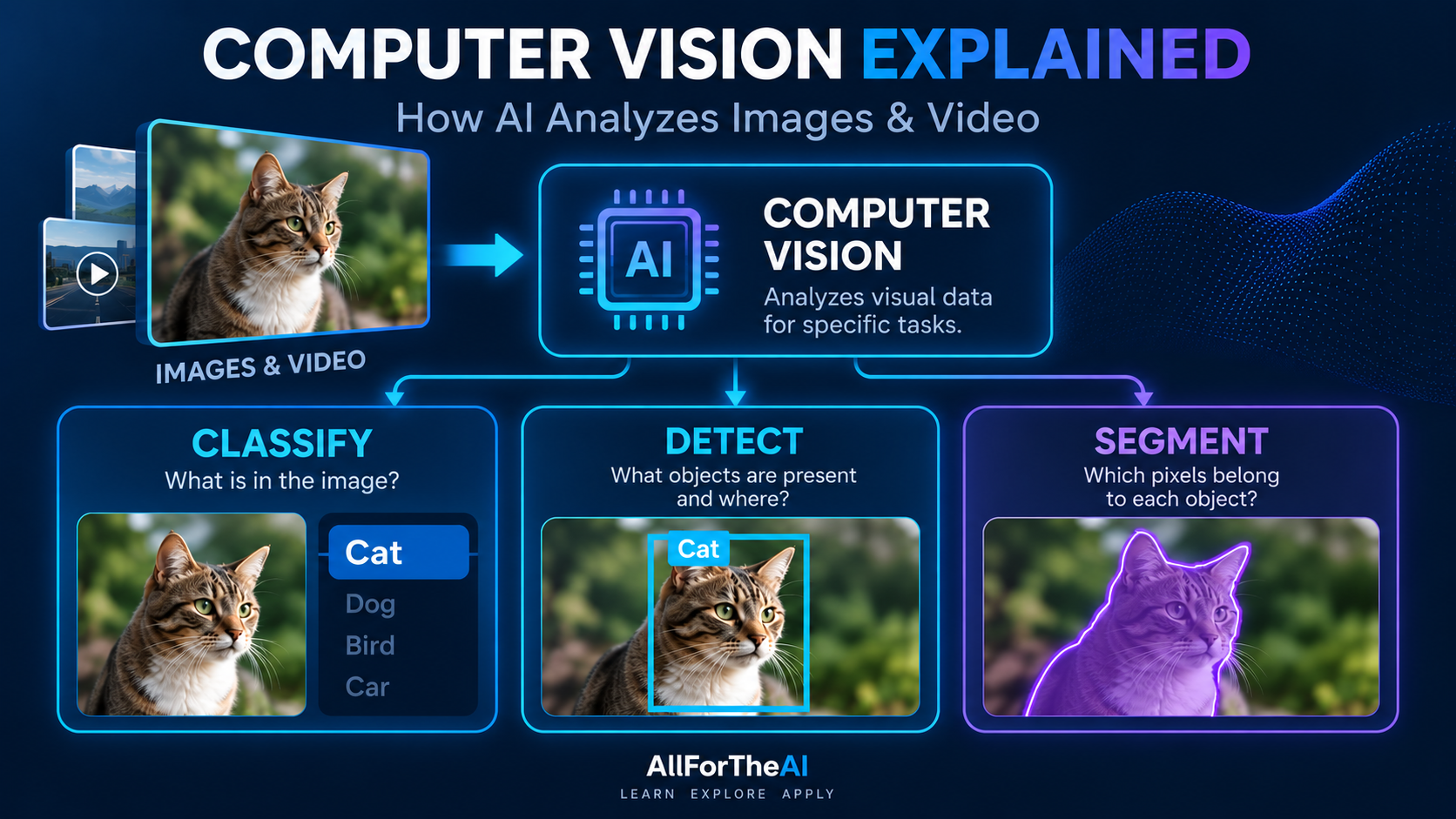
Computer vision is the visual branch of machine perception. It uses computational systems to extract task-relevant information from images and video.
Humans see the world visually and instantly recognize objects, faces, and motion.
Computer vision addresses similar visual problems with computational methods, but those methods are not equivalent to human vision or human understanding.
Instead of eyes and a brain, AI uses:
- cameras or image files
- pixels and numbers
- machine learning models
A simple way to think about it:
- Images and video are represented numerically
- Algorithms and models process those numerical representations
- The system produces a task-specific output such as a class, location, mask, track, or measurement
How Does Computer Vision Work?
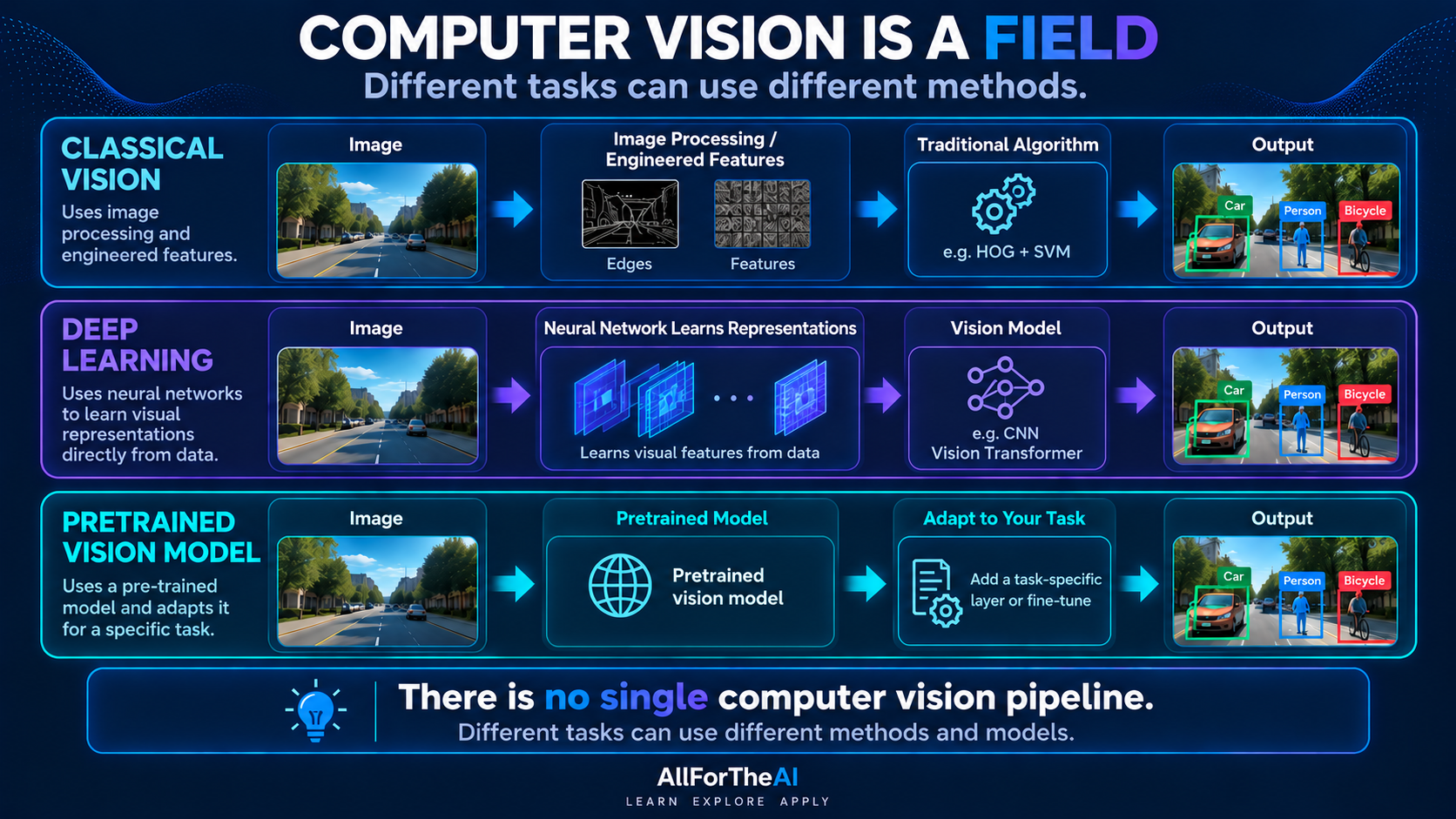
Computer vision is a field with multiple approaches. Different tasks may use image processing, learned representations, geometric methods, neural networks, or combinations of these techniques.
At a high level, computer vision systems vary by task and method rather than following one fixed four-step process.
Step 1 — Image or Video Input
Everything starts with visual data.
This can be:
- a photo
- a video clip
- a live camera feed
- a single video frame
Behind the scenes, images are broken down into pixels, each represented by numerical values.
Before features are extracted, the raw image is often preprocessed — resized, normalized, and cleaned — so that models can analyze it more effectively.
Step 2 — Feature Extraction
Next, the AI looks for patterns inside the image.
Early computer vision systems relied on manually programmed features like:
- edges
- corners
- shapes
Modern systems use deep learning models to automatically learn features such as:
- textures
- colors
- object boundaries
- spatial relationships
This is where neural networks shine.
Modern learned computer vision systems may use large visual datasets, smaller task-specific datasets, synthetic data, transfer learning, or pretrained models depending on the problem.
Step 3 — Neural Network Processing
The extracted features are fed into a neural network — usually a convolutional neural network (CNN) or a modern vision transformer.
These models:
- compare patterns to what they learned during training
- calculate probabilities
- refine predictions layer by layer
This process is powered by the same deep learning principles explained in Deep Learning 101: Neural Networks for Beginners.
Step 4 — Output or Prediction
Finally, the model produces an output such as:
- a label (“cat,” “car,” “tumor”)
- bounding boxes around objects
- pixel-level segmentation
- motion or behavior detection
In short:
Visual input → representation or processing method → task-specific model or algorithm → measurable output
Common Computer Vision Tasks
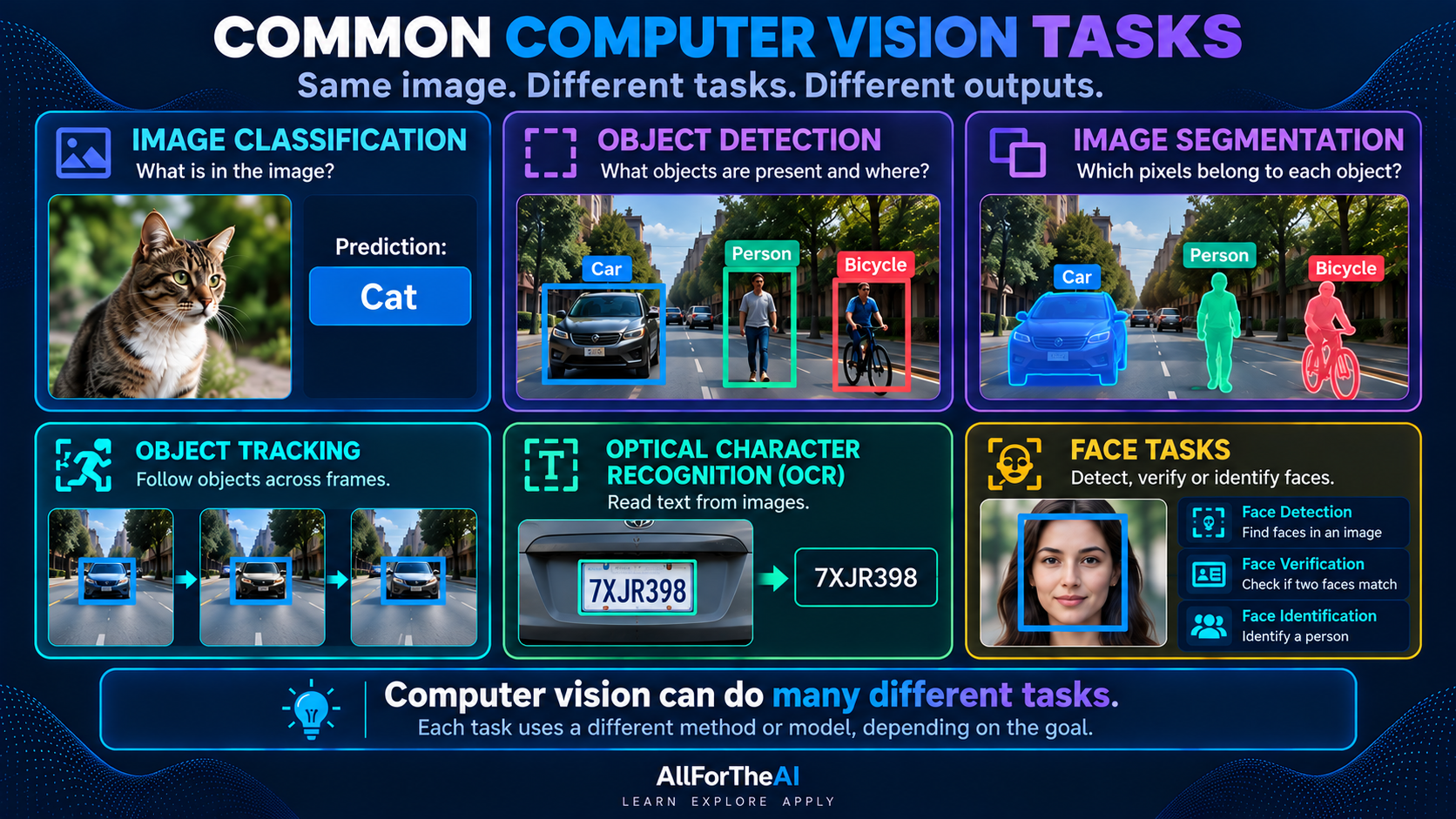
Computer vision isn’t one single task — it’s a collection of related capabilities.
Here are the most common ones you’ll see in real applications.
Image Classification
Image classification answers one question:
“What is in this image?”
Examples:
- identifying animals in photos
- sorting product images
- classifying medical scans
Object Detection
Object detection goes a step further:
“What objects are in this image, and where are they?”
Examples:
- pedestrians in self-driving cars
- people in security footage
- items on a store shelf
Image Segmentation
Segmentation divides an image into meaningful regions at the pixel level.
Examples:
- highlighting tumors in medical images
- separating foreground and background
- precise scene understanding
Tracking, OCR & Face Recognition
Computer vision also includes tasks such as tracking objects across video, extracting text from visual documents with OCR, and detecting or comparing faces. These tasks solve different problems and should not be treated as one generic recognition capability.
Examples:
- tracking a player, vehicle, or other object across video frames
- extracting printed or handwritten text with optical character recognition (OCR)
- face detection, verification, or identification — related tasks with different error and privacy implications
Computer Vision Models Explained
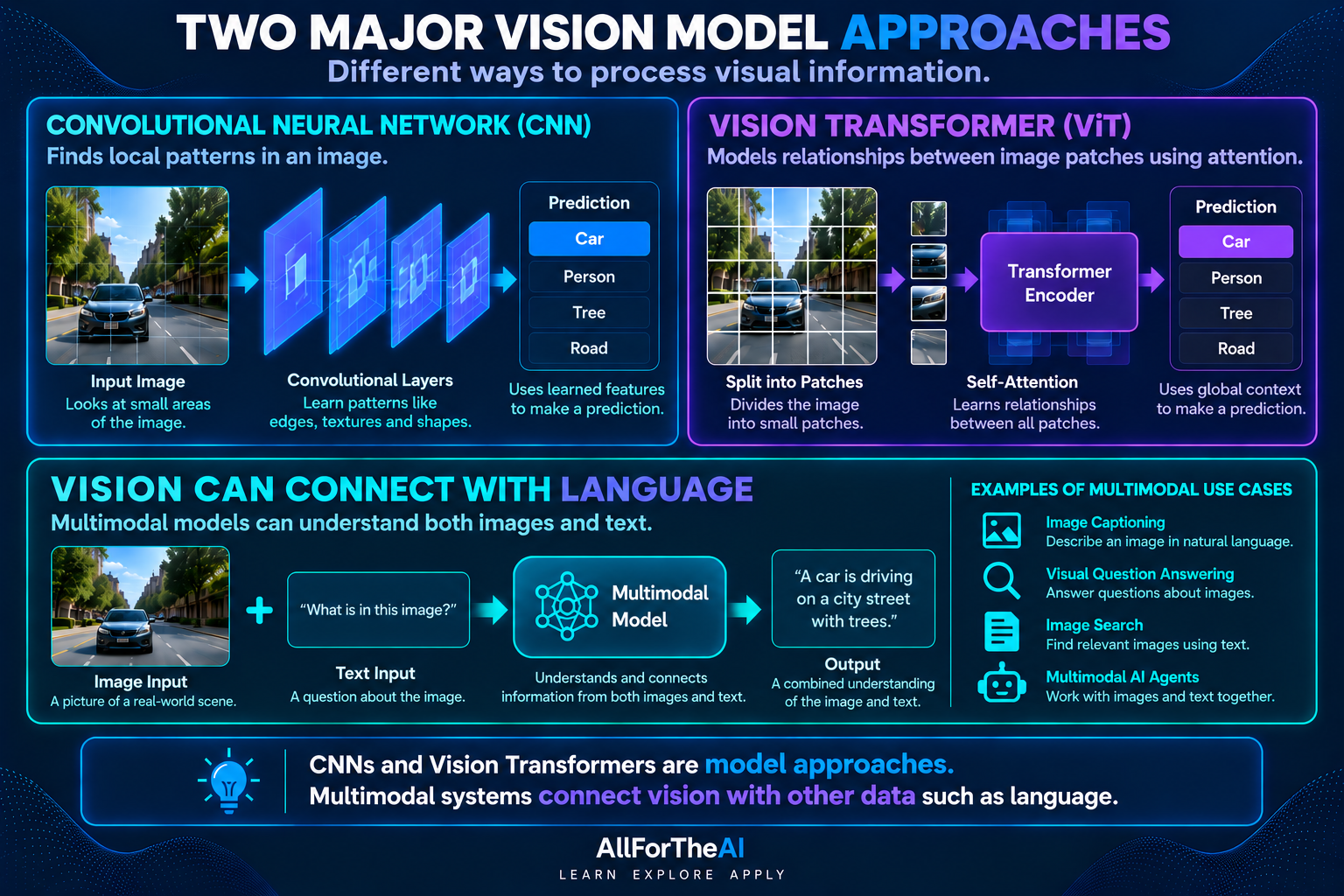
Different computer vision tasks can use different model families and processing methods. Two important modern neural-network approaches are convolutional neural networks and vision transformers.
Convolutional Neural Networks (CNNs)
CNNs are the backbone of traditional computer vision.
They are designed to:
- scan images in small sections
- detect patterns like edges and shapes
- learn increasingly useful visual representations
CNNs are widely used for:
- image classification
- object detection
- medical imaging
Vision Transformers
Vision transformers divide images into patches and use attention mechanisms to learn relationships among those visual representations.
Instead of scanning locally like CNNs, they:
- analyze relationships across the entire image
- focus attention on important regions
Their effectiveness depends on the task, training setup, data, model scale, and whether a pretrained model is being adapted.
Where Vision Connects to Multimodal AI
Multimodal models combine computer vision with other AI fields such as language.
These models can:
- analyze images and text together
- answer questions about images
- generate captions or explanations
This is where computer vision connects directly with NLP explained and generative AI systems.
Where Is Computer Vision Used? (Real Examples)
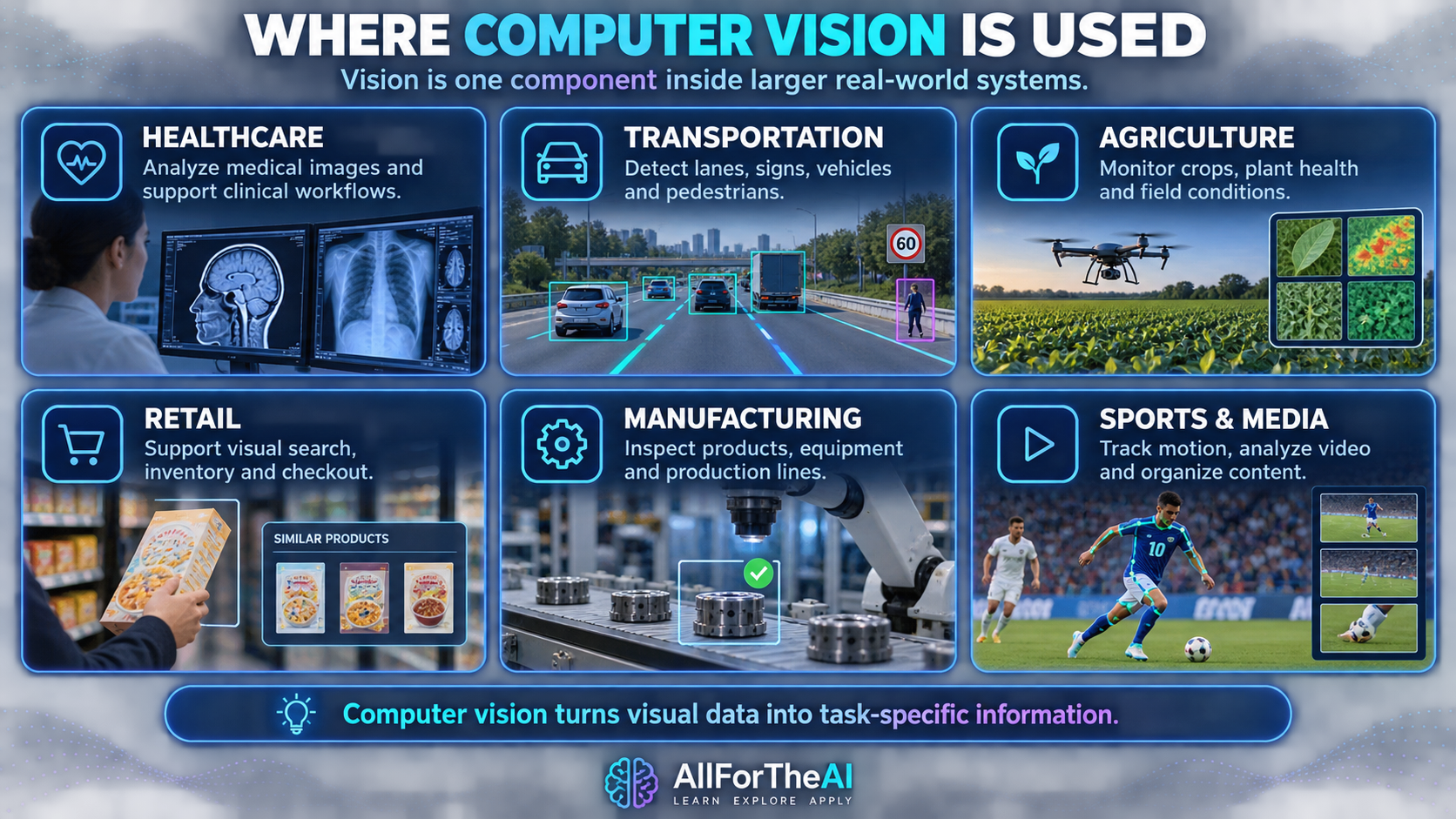
Computer vision is already used across many real-world systems. In practice, these systems usually combine visual models with other software, sensors, rules, data sources, or human workflows, so computer vision should be understood as one component rather than the entire system.
Agriculture & Farming
Computer vision is increasingly used in agriculture to monitor crops and improve yields.
Examples include:
- drones analyzing crop health
- detecting plant diseases early
- optimizing irrigation and fertilizer use
By analyzing images from fields and satellites, AI helps farmers make better, data-driven decisions.
Sports Analytics
Sports teams use computer vision to analyze player movement and performance.
Common uses include:
- tracking player positions during games
- analyzing posture and motion
- improving training and injury prevention
This allows coaches to gain insights that are difficult to spot with the human eye alone.
Augmented Reality (AR) & Virtual Reality (VR)
Computer vision plays a key role in AR and VR systems.
It enables:
- gesture tracking
- face and body movement detection
- realistic object placement in virtual environments
This technology powers applications like virtual try-ons, immersive gaming, and interactive experiences.
Healthcare
- medical image analysis (X-rays, MRIs, CT scans)
- early disease detection
- surgical assistance
Self-Driving Cars
- lane detection
- traffic sign recognition
- pedestrian detection
- collision avoidance
Retail & E-commerce
- visual search
- automated checkout
- inventory tracking
- product recommendations
Security & Surveillance
- face recognition
- anomaly detection
- crowd monitoring
- access control
Social Media & Content Platforms
- automatic photo tagging
- content moderation
- image enhancement
- augmented reality filters
These computer vision applications show how AI systems interpret and act on visual information in the real world.
Computer Vision vs NLP vs Generative AI
These AI fields are often confused, but they focus on different data types.
- Computer Vision: a field focused on tasks involving images and video
- NLP (Natural Language Processing): a field focused on language-related tasks
- Generative AI: systems that generate or transform content and can operate across language, vision, audio, or multiple modalities
They often work together.
For example, a generative AI system may use computer vision to analyze images and NLP to describe them.
How Computer Vision Is Evaluated
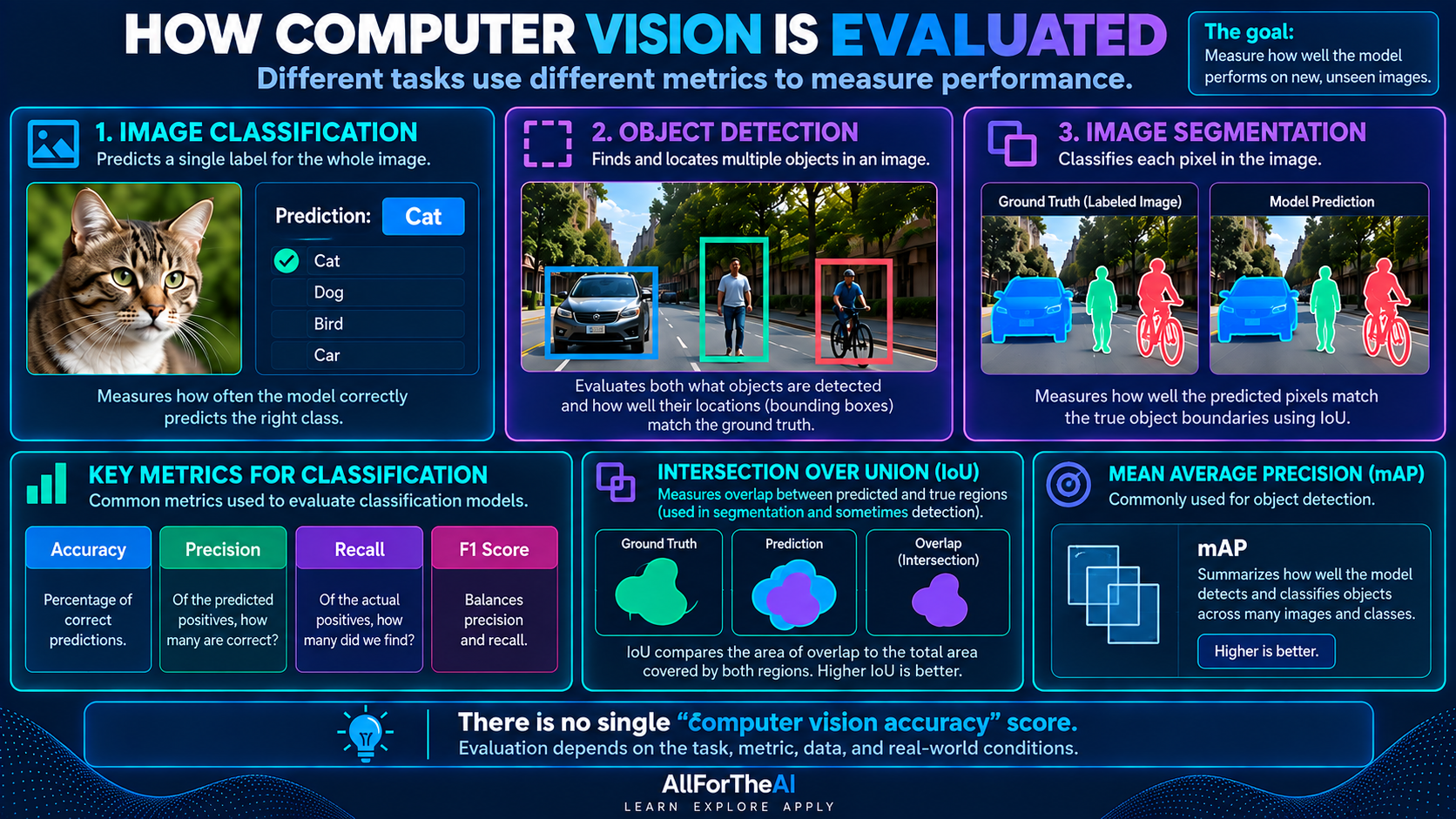
There is no single universal computer vision accuracy score. Evaluation depends on the task being solved and the consequences of mistakes.
- Classification: metrics can include accuracy, precision, recall, and F1 score.
- Object detection: evaluation considers whether objects were found and how well predicted boxes overlap the correct locations.
- Segmentation: metrics compare predicted regions or pixels with reference annotations.
- Face recognition and other sensitive systems: false matches, false non-matches, threshold choices, subgroup performance, and deployment conditions all matter.
Real-world evaluation can also include robustness, latency, privacy, failure rates, and performance when cameras, lighting, locations, or populations differ from the development data.
Limitations & Risks of Computer Vision
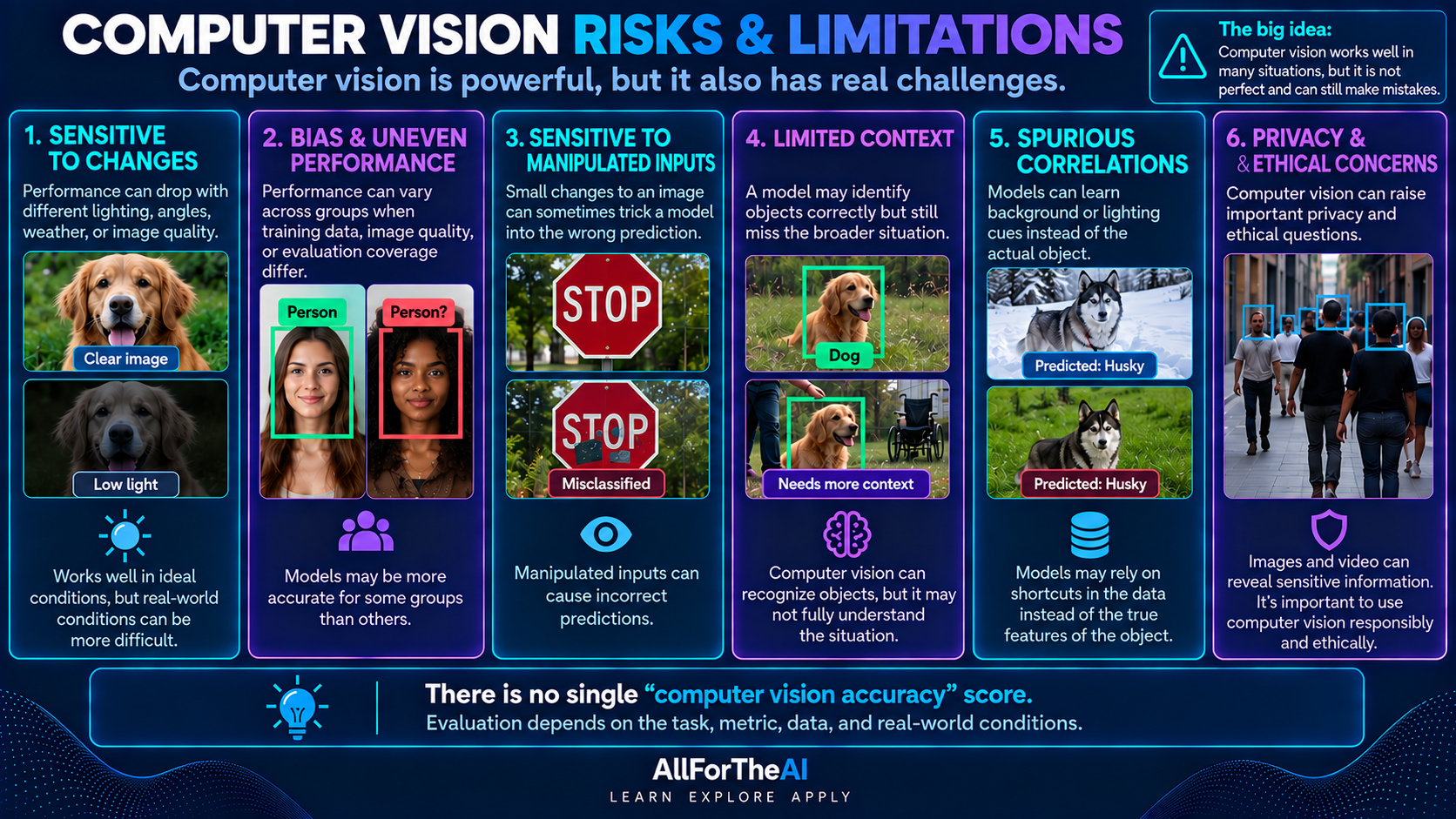
Despite its power, computer vision has important limitations.
Bias in Visual Data
If training images lack diversity, models may:
- perform poorly on certain skin tones
- misidentify objects in uncommon conditions
- reinforce existing biases
Privacy Concerns
Computer vision raises serious privacy questions, especially with:
- facial recognition
- public surveillance
- biometric data
Errors & Misidentification
AI vision systems can:
- mislabel objects
- miss important details
- fail in unusual lighting or angles
Context Blindness
Computer vision sees pixels — not intent or meaning.
An image may be technically recognized correctly but still misunderstood in context.
Distribution Shift
Performance can drop when real-world cameras, locations, weather, image quality, populations, or operating conditions differ from the data used during development and evaluation.
Spurious Correlations
A model can rely on background details, textures, watermarks, or other unintended cues instead of the visual evidence people expect it to use.
Annotation and Data Quality
Incorrect, inconsistent, or incomplete labels and bounding boxes can affect both model training and the reliability of evaluation.
Robustness and Confidence
A high confidence score does not guarantee a prediction is correct. Real systems also need testing for unusual inputs, latency, failure modes, and the consequences of mistakes.
How to Start Learning Computer Vision
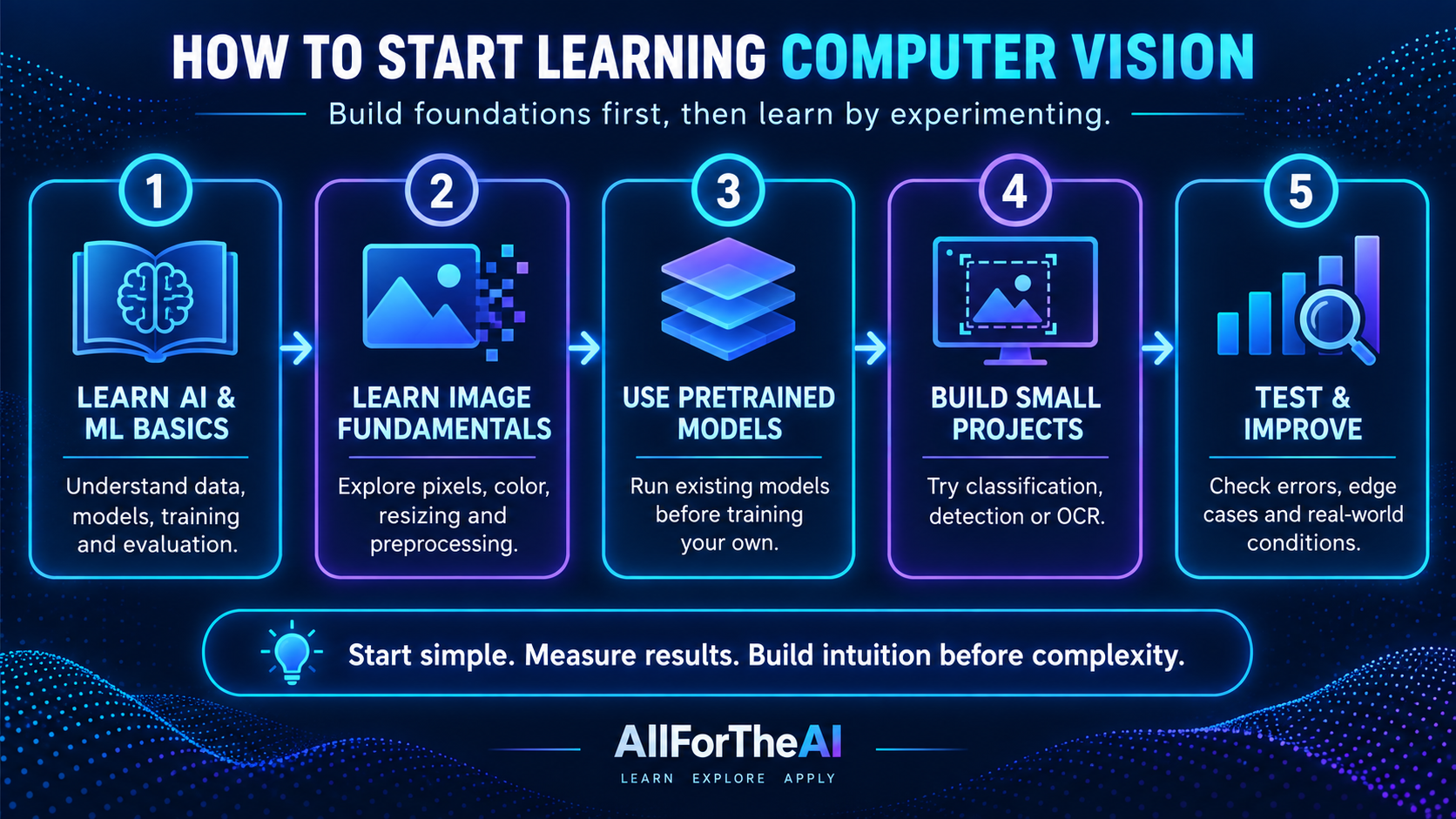
You don’t need to be an expert to begin.
A beginner-friendly path looks like this:
- Learn basic AI and ML concepts
- Understand neural networks (especially CNNs)
- Explore pre-trained computer vision models
- Experiment with simple projects
- Build intuition before complexity
Useful supporting foundations include Dataset Fundamentals, Data Preprocessing, and Model Evaluation Metrics. For the next Computer Vision lesson, continue to Image Classification Explained.
Popular Computer Vision Tools Beginners Encounter
If you explore computer vision further, you’ll often hear about these tools:
- OpenCV — a widely used open-source library for image and video processing
- TensorFlow & PyTorch — frameworks used to train deep learning vision models
- Google Vision API / AWS Rekognition — prebuilt computer vision services for tasks like image labeling and face detection
Beginners usually start by experimenting with pre-trained models before training their own.
How This Guide Was Reviewed
Last reviewed: September 12, 2026. This guide was reviewed for beginner clarity, technical accuracy, learning-path fit, and responsible treatment of sensitive computer-vision applications.
Key references used for this review include Stanford CS231n for modern computer-vision task coverage, IBM’s computer-vision overview for accessible task definitions, and NIST’s Face Recognition Technology Evaluation material for face-recognition error and demographic considerations.
- Stanford CS231n: Deep Learning for Computer Vision
- IBM: What Is Computer Vision?
- NIST: Face Recognition Technology Evaluation — Demographic Effects
FAQ
What is computer vision in simple terms?
Computer vision is a field of AI that builds systems to process images and video for tasks such as classification, detection, segmentation, tracking, and visual measurement.
Is computer vision part of AI?
Yes. Computer vision is a major subfield of artificial intelligence.
How accurate is computer vision?
Accuracy depends on data quality, model design, and use case. Some systems outperform humans in narrow tasks, while others still struggle.
Is computer vision the same as image recognition?
Image recognition is one task within computer vision, but computer vision includes many other tasks like detection and segmentation.
How is computer vision used in everyday life?
Phones, cars, social media apps, healthcare tools, and security systems all use computer vision daily.
Conclusion
Computer vision gives AI systems ways to process visual data and produce useful task-specific outputs.
Computer vision can contribute to systems ranging from medical-image analysis to autonomous-system perception and everyday smartphone features, but those systems usually combine vision with other models, sensors, rules, or human workflows.
The key takeaway is simple:
Computer vision is powerful — but it’s not perfect.
It works best when paired with human judgment, high-quality data, and ethical oversight.
Continue the Computer Vision learning path with Image Classification first, then use the additional guides below for supporting background.
You’re now equipped with one of the most important building blocks of modern AI.